We no longer support this browser. For an optimal experience, we recommend updating your browser.

How to upgrade or replace a CenturyLink modem
Need to upgrade your old equipment or replace a faulty modem? We can help. The first step is to verify with tech support that your modem needs to be replaced.
Requesting a new modem
Technical support will help troubleshoot to determine whether you need a replacement modem. Follow these steps to get started:
- Contact the repair department by chat (or by calling 800-244-1111). A support agent will check a few things with you to determine if the issue with your current modem can be resolved, or if it needs to be replaced.
- If the agent sees that the modem is outdated or is malfunctioning, they will help you order a new one. You can also ask for options if you want to upgrade your modem regardless of the troubleshooting results.
From there, the question of who covers the cost will depend on the tech support review and whether you are leasing or purchased your modem.
If you're leasing your modem from us, we'll cover the replacement of any equipment that is determined to be faulty or too old for optimum performance.
How do you know if you're leasing your modem? You'll see a monthly charge on your bill, which may be called a "gateway" or "equipment" fee.
All purchased modems come with a 12-month warranty.
Am I still under warranty?
If you purchased your modem from us, start by determining whether your warranty is active:
- Look at the date on your first bill or order confirmation letter.
- Check your personal bank statements for the purchase from CenturyLink.
- Ask the agent to check your account history when you call or chat with tech support.
Will my warranty cover a replacement modem?
- If you're under warranty, then yes, your warranty will cover the cost of a replacement modem if verified by technical support.
If your warranty has expired, then you will have the option to either purchase or lease a new modem and cover this cost yourself.
Order a new modem online*
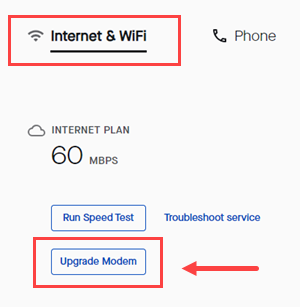
Sign in to My CenturyLink, click on the Services tab in the top menu and look for a button to Upgrade Modem. If you don't see the button, you can call or chat and an agent will help you.
*Online modem ordering not available for all customers.
Costs for modems vary, depending on whether you are leasing or purchasing. Rates are subject to change, so contact us for current pricing.
More CenturyLink modem information
Or visit the Modems/Routers main page for more information about CenturyLink modems.
Modem Recycling

Return your old CenturyLink modem and we'll recycle it.
No cost to you.
Support tools


Support topics



About Lumen | About CenturyLink | Careers | Investor Relations | Newsroom | Legal | Privacy Notice | Tariffs | Customers with Disabilities | Site Map | Cookie Settings | CenturyLink in Your Area | CenturyLink.net | White/Yellow Pages | GetCenturylink | CenturyLink Internet Partner
Residential | Small Business | Enterprise | ©2026 CenturyLink. All Rights Reserved.