We no longer support this browser. For an optimal experience, we recommend updating your browser.

Using your C4000 modem
Learn about using your C4000 series modem/router.
Recommended CenturyLink modem
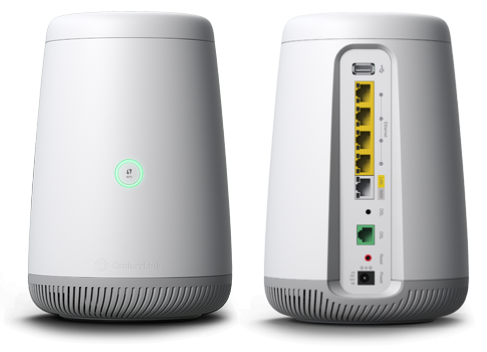
C4000 features
- WiFi 6 technology with dual-band 2.4 GHz and 5 GHz 802.11ax
- Smart Connect single wireless network (SSID): Auto-selects the fastest band for each device
- Single LED status light
- Dynamic QoS: Prioritizes data through the router for smoother streaming
- Standards-based WiFi WPA3 security
Speed specifications
This router comes in multiple versions with different specifications. The one you have depends on your internet connection type. Click to open the specific models below for speeds and downloadable info sheets.
The C4000BG and C4000BZ are tested and certified to run at these speeds* on the CenturyLink® High-Speed Internet network:
| Technology Type | Tested speed |
| ADSL2+ pair bond | up to 40 Mbps |
| VDSL pair bond | up to 140 Mbps |
*Customer speed experiences will vary, particularly when accessing the internet wirelessly from different devices. Maximum download/upload speeds given are via a wired connection. Internet speeds are not guaranteed due to conditions outside of network control, including customer location, devices, equipment, and access over a wired or wireless connection; see centurylink.com/internetpolicy for more information.
The C4000LG and C4000LZ are tested and certified to run at these speeds* on the CenturyLink® High-Speed Internet network:
| Technology Type | Tested speed |
| ADSL | up to 7 Mbps |
| ADSL2+ | up to 20 Mbps |
| VDSL | up to 100 Mbps |
*Customer speed experiences will vary, particularly when accessing the internet wirelessly from different devices. Maximum download/upload speeds given are via a wired connection. Internet speeds are not guaranteed due to conditions outside of network control, including customer location, devices, equipment, and access over a wired or wireless connection; see centurylink.com/internetpolicy for more information.
The C4000XG is tested and certified to run at these speeds* on the CenturyLink® Fiber Internet network.
| Technology Type | Tested speed |
| Fiber | up to 940 Mbps |
*Customer speed experiences will vary, particularly when accessing the internet wirelessly from different devices. Maximum download/upload speeds given are via a wired connection. Internet speeds are not guaranteed due to conditions outside of network control, including customer location, devices, equipment, and access over a wired or wireless connection; see centurylink.com/internetpolicy for more information.
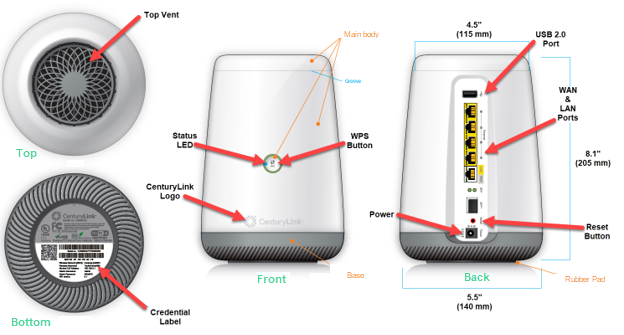
Diagram of the C4000XG modem
Top modem settings and tasks
Learn how to manage your internet and WiFi network using your modem. Below are some of our most popular topics. You can also visit the modem settings guide for a complete overview of settings and options.
Learn how to access your modem settings and how you can use them to manage your network.
Modem troubleshooting tips
- If your internet connection is spotty or slow, try restarting your modem.
- If a restart doesn't work, try our online Troubleshooter.
- Chat with us for further assistance.
- You might need to do a factory reset if advised by an agent or technician.
Video: How to control your C4000 wireless settings
Starting new service? Please note that a phone jack is required to set up CenturyLink internet service in your home. If you don't have a jack, chat with us to have one installed.
Instant Fiber
Support tools


.png)


Browse news, entertainment, weather, and more.
Instant Fiber
Support topics



About Lumen | About CenturyLink | Careers | Investor Relations | Newsroom | Legal | Privacy Notice | Tariffs | Customers with Disabilities | Site Map | Cookie Settings | CenturyLink in Your Area | CenturyLink.net | White/Yellow Pages | Centurylink Retailer | CenturyLink Internet Partner
Residential | Small Business | Enterprise | ©2026 CenturyLink. All Rights Reserved.